
DevOps with Azure Policy and Hidden Risks
Azure Policy looks like a real-time control plane, but it isn't. Implicit properties, evaluation cycles, and alias drift can quietly break your compliance without ever raising a flag.
Azure Policy is the backbone of enterprise governance in Landing Zones. Microsoft’s ALZ repository comes with a massive library of policies. However, apart from the most crucial security-related ones, most customers opt-out of assignments during the initial deployment. It’s a logical move: too many policies without a deep understanding of their impact turns the Landing Zone into a blocker for application teams. However, the gradual implementation of policies chosen as logical move, rarely catches up with the scale of the environment
The need for a proper Policy Workflow is usually only recognized when the situation becomes untenable. Eventually you build your policy team, implement Policy-as-Code, enable CI/CD, and think you're safe. But there are multiple issues that still pose significant risk to your tenant compliance if you don’t consider them!
Implicit Resource Properties
This is quite a striking situation which might affect many policies and may leave you wonder why your deny policy does not work. When you do a deployment in Azure, regardless of the tool you use, everything (exceptions exist for preview resources which haven’t gone GA yet) ends up as an Azure REST API call. For example, if you deploy the following Eventhub Namespace, this gets converted to Azure REST API call (for Bicep and ARM Templates, it goes through ARM engine also) and the fields which you have not specified but actually required for this resources gets filled automatically by Azure.
resource r_berkentesteh 'Microsoft.EventHub/namespaces@2022-10-01-preview' = {
  name: 'berkentesteh2'
  location: 'westeurope'
  sku: {
    name: 'Basic'
    tier: 'Basic'
    capacity: 1
  }
}
For example, the publicNetworkAccess of this Eventhub Namespace is automatically set to Enabled for this API version of 2022-10-01-preview. The issue starts here: Suppose you already had the following deny policy which prevents deployment of Eventhub Namespaces whose publicNetworkAccess set to Enabled. You would expect this policy to prevent deployment of the above Eventhub Namespace but it does not and deployment finishes successfully.
"policyRule": {
  "if": {
    "allOf": [
      {
        "field": "type",
        "equals": "Microsoft.EventHub/namespaces"
      },
      {
        "field": "Microsoft.EventHub/namespaces/publicNetworkAccess",
        "equals": "Enabled"
      }
    ]
 },
  "then": {
    "effect": "deny"
  }
}
Here is the reason; When you deploy the above bicep file, where publicNetworkAccess does not explicitly appear, your deny policy only inspects this file right before it is taken by the Azure Resource Providers for deployment process. At that exact moment, policy inspection does not see a field for publicNetworkAccess as Enabled and allows deployment. Once the deployment requests arrive to Azure Resource Providers, they add such required fields (like publicNetworkAccess) implicitly, effectively enabling bypassing of policy inspections.
On the other hand, if you also have the same policy but now with audit effect, you will see that Azure Policy catches this Eventhub Namespace and shows it as non-compliant resource because of publicNetworkAccess field is showing as Enabled. This is because the audit effect works by querying the existing resources from Azure REST API and getting the whole structure of that resource not just what is sent by the user.
So you should be aware that people can bypass your deny policies by considering these implicitly filled properties. This issue is a side effect of how Azure Policy Engine works. To prevent such implicit field additions by-passing your policies, you have to adjust your custom policy accordingly and enforce the implicitly filled properties be present in your template with exists condition. In the above case, we have to just add exists condition as follows:
{
  "policyRule": {
    "if": {
      "allOf": [
        {
          "field": "type",
          "equals": "Microsoft.EventHub/namespaces"
        },
        {
          "anyOf": [
            {
              "field": "Microsoft.EventHub/namespaces/publicNetworkAccess",
              "exists": "false"
            },
            {
              "field": "Microsoft.EventHub/namespaces/publicNetworkAccess",
              "equals": "Enabled"
            }
          ]
        }
      ]
    },
    "then": {
      "effect": "deny"
    }
  }
}
This will enforce the users put publicNetworkAccess on their deployment and with that they won’t be able to bypass your company’s “no public network access policy” even for deny effect at time of deployment.
(Note: After a certain while following the deployment, the deny policy will also show as non-compliant even though it permitted the deployment. This is because, it will run again on whole structure of the resource just like audit policy, yet this non-compliance does not have any impact on resource).
Implicitly Filled Property Variations
A side note about implicitly filled properties is that these values can vary by the API version. For example, minimumTlsVersion of Eventhub namespace is filled as "1.0" in API version of 2017-04-01 where as it is filled as "1.2" in API Version of 2024-01-01. If you had an audit policy enforcing TLS version “1.2”, the one deployed with older API version will show as non-compliant whereas the resource deployed with new API Version will be compliant. From the perspective of Azure policy this is not a problem and the behavior is as expected but for the people who use Infrastructure as Code , this is a reminder that newer API Versions is not always the same resource even though the content of their BICEP, ARM or Terraform templates are kept same.
Evaluation Cycles
While industry treats Azure Policy like a real-time control plane it is not and this belief can create a blind spot! As mentioned in first section, Azure Policy operates based on two types of trigger:
- At the time of a resource deployment when deployment template drops into Azure (right before Azure Resource Providers take them for processing).
- At certain evaluation cycles for inspection of existing resources as in
auditorDeployIfNotExists.
The issue with evaluation cycles is that they can range from 30 minutes to 24 hours, especially for the DeployIfNotExists effect. If you are familiar with it, you know this effect is also used for critical security features, like deployment of SQL firewall rules in case an Azure SQL server is deployed. This effect, however, does not prevent a delete operation on the firewall rule. This means; if a firewall rule is deleted, you might have a SQL server without proper firewalling for almost 24 hours. For such situations, the answer is again complementary control. For such security related use of DeployIfNotExists effect, you also need policies that also take immediate effect when Azure Rest API is triggered. For the SQL Firewall example, you should use denyAction for delete operation on the corresponding firewall rule resources, filtered within the if section of your policy.
Alias Deprecation or Change
In Azure, resource properties and their Azure policy aliases do not get deprecated easily. So even if some aliases that do not appear in newer API versions of that resource, you can still use that Alias in your policy. But that also means, the policy condition that involves this alias will only be effective if the resource has that field. So if you do a deployment with newer API versions where this field that you want to inspect has new path in the deployment template (i.e, new alias for the same property), your old policy will not catch it (since it uses old alias). For such rare cases, you would need to adjust your policy to also look for this new alias.
The Mystery of the Count Operation
Count operation in Azure policy is quite a confusing subject therefore even in the most well developed enterprise tenants its use is very basic. There are many reasons for the confusion; For example, the same count operator can be used for different processes such as counting objects of object arrays or counting elements of other array types such as string arrays. Things get more confusing when you want to have nested count operators also. However the main issue with count operator is the fact that the counted objects are not presented under compliance reports to user. This prevents the developers understand how it really functions. Hence, the policy developers use them only for very simple cases without making use of its full potential. There is no solution for this problem in native Azure landscape. The only solution in the market exists within Clophi where it's Policy Feature presents you the counted objects with full visibility.
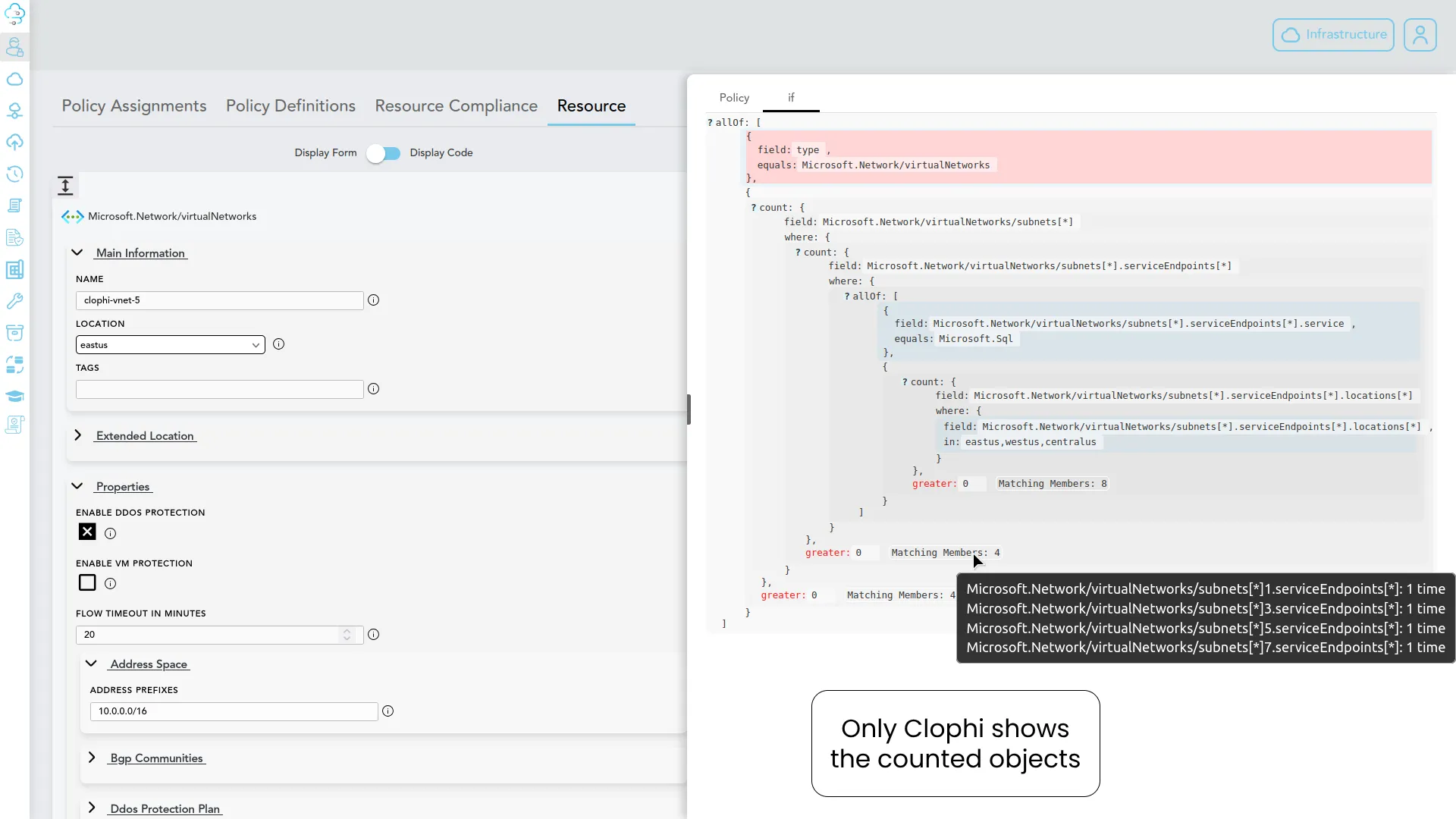
A view from Clophi; on left you see the properties of inspected resource and on right tab you see the policy definition together with counted objects as well as the matching policy fields highlighted in red.
(Note: I won't dive too deep into Clophi here, as I plan to cover its automated Azure Policy Builder in an upcoming article, but it is currently a highly effective solution for this native visibility gap).
There are further intricacies with Azure Policies but I think it’s enough for this article as i don’t want to bombard the reader with further details in a single article. However if you have any specific topics to discuss around Azure Policies or Azure, please do not hesitate to reach me, I am always open for it!

Enterprise Grade Azure Management
@2026 Clophi all right reserved.
Information
Company
Features
Enterprise Grade Azure Management
Information
Pricing
Docs
Privacy Statement
Terms Of Service
Company
About Us
Contact our team for your need
Why Clophi?
Request a demo
Professional Services
Features
Drift Detection
Enterprise Policy
Infrastructure Repository Generator
Policy Generator - Policy Engine
Infrastructure As Code
Server Configuration
Devops Tooling
Team Collaboration
Azure Integration
@2026 Clophi all right reserved.