Create Azure policies with a piece of mind! Just in seconds!
Build policy definitions, assignments, and initiatives through Clophi, then evaluate every resource in your tenant against them with full field-level visibility into what's compliant and what isn't.
Policy Generator
Azure Policy Authoring
play_circle_filled Live Demo
Azure Policy authoring is a multi-faceted process requiring expertise in JSON, resource alias paths, and the policy rule language. Clophi brings all this expertise into a unified platform where the user can NOT make any logical or syntactical errors.
Policy generator
Build policy definitions, assignments, and initiatives through Clophi's interface. No JSON, no alias paths, no errors, completely deterministic!
Built-in Policies
You can author your Azure Policy from scratch but you can also use one of Microsoft's ~5000 Built-in Policy Definitions which are already integrated into Clophi as a starting point for your policy definition.
The problem with Azure policies
Azure policy is one of the most powerful governance tools in the cloud and one of the most complex to manage. Definitions are written in a JSON rule language with alias paths that are difficult to manage. And when a resource fails compliance, the portal tells you that it failed by providing just one rule block from the policy rule. Clophi simplifies the entire lifecycle including Policy Evaluation Engine so policy management becomes a workflow.
Why Switch
Azure Portal vs. Clophi Policy Center
The Azure Portal gets you started — Clophi takes you the rest of the way. Here's how we compare on the things that matter most.
Feature
Azure Portal
Clophi Policy Center
Compliance Visibility
close Limited Limited insight into why a resource is non-compliant.
check Deep Visibility Resource-level visibility showing the exact property causing non-compliance, directly on the resource.
Non-Compliance Root Cause
close Manual Requires manual inspection of policy JSON and resource properties. Does not reveal which objects are counted inside a count block.
check Automated Highlights the exact failing field in both the resource UI and the policy — and displays every object counted within a policy's count block, dramatically accelerating remediation.
Policy Creation Experience
close Error-Prone JSON-based authoring with no safeguards. Logical and syntax errors are common.
check Guided Visual Policy Builder ensures error-free creation, preventing both logical and syntactical mistakes.
Policy Understanding
close Opaque No inline explanations for policy blocks. Requires deep Azure Policy expertise.
check AI-Assisted Provides AI-generated descriptions for every policy block, making even the most complex policies instantly understandable.
Existing Policy Reuse
close Cumbersome Importing and modifying existing policies is cumbersome and JSON-heavy.
check One-Click One-click import of policies with full visual editing and customization.
Non-Compliant Resource Remediation
close Fragmented Requires switching between Policy, Resource, and Configuration views across the portal and repositories.
check Unified Modify non-compliant resources directly inside Clophi using a familiar Azure Resource UI.
Operational Efficiency
close Slow Frequent context switching, manual debugging, and trial-and-error workflows.
check Streamlined Single unified workflow from detection to remediation — saving significant time and effort.
Evaluation engine
See exactly which field triggered your Azure Policy
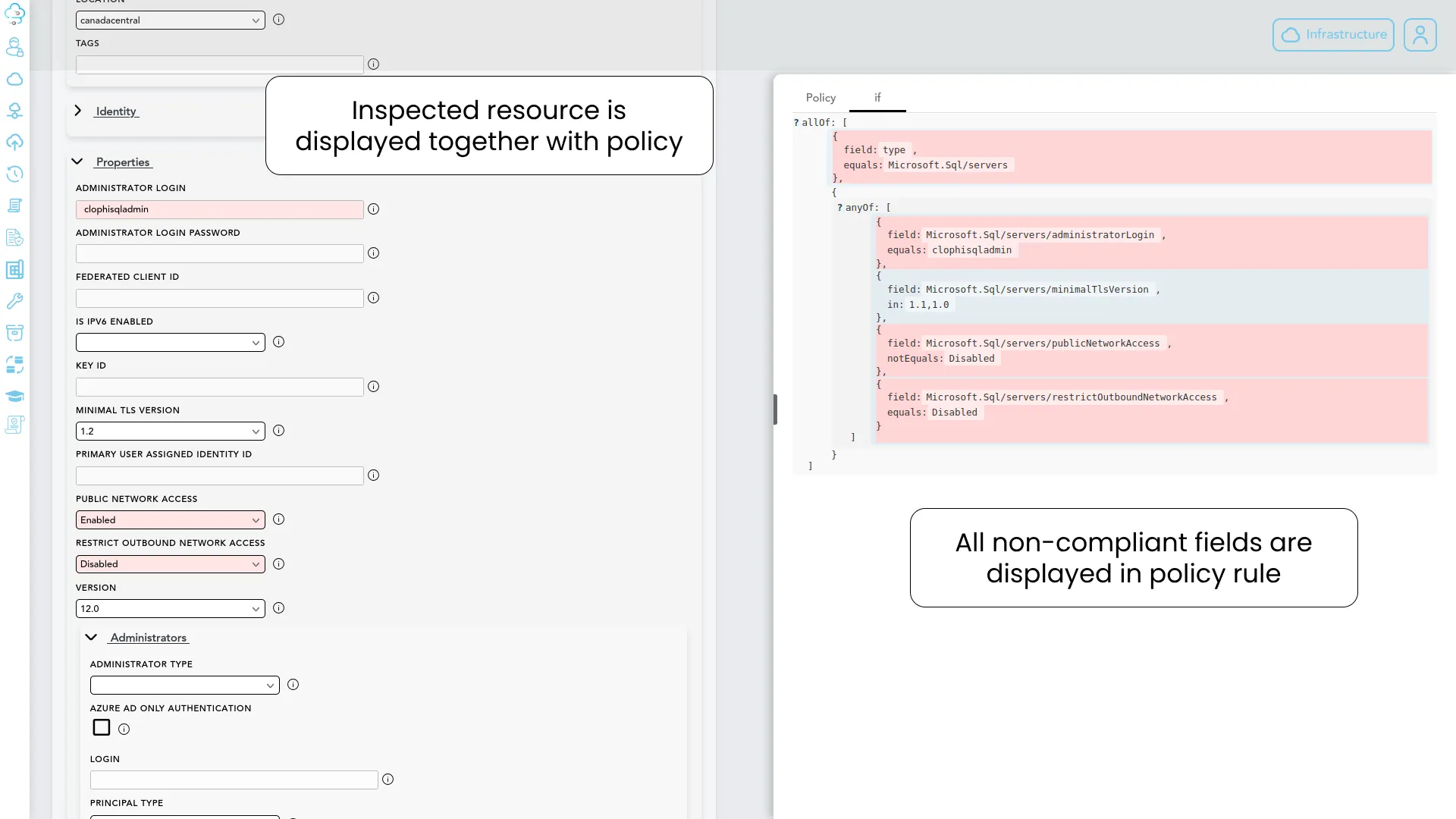
Clophi runs its own compliance engine against every resource in your tenant. When a resource fails a policy, the engine presents the specific field that triggered the violation, visible both in the resource configuration and in the policy rule that caught it.
A note on Azure's native compliance view
Azure's native policy compliance view shows non-compliant resources but it does not show all the fields of a resource that cause a policy violation. You are left to guess! Investigating why a resource caused policy violation means manually inspecting its configuration against the policy rule. This leads to significant delays on infrastructure operations.
Field-level visibility on the resource
When you open a non-compliant resource in Clophi. The fields that triggered policy violations are marked as red both on the resource (see below screenshot on left side) and on the policy definition (see below screenshot on right side).
Field-level marking inside the resource configuration view.
Non-Compliant Resource Handling, In-Place
Stop context switching to fix issues. Clophi enables you to modify non-compliant resources directly on the fly. In-place resource modification lets you correct a non-compliant resource using a standard Azure Resource UI view — including easy field changes — without ever leaving the Clophi environment.
play_circle_filled Live Demo
Evaluation Engine - Count logic visibility
See every object counted by a policy rule
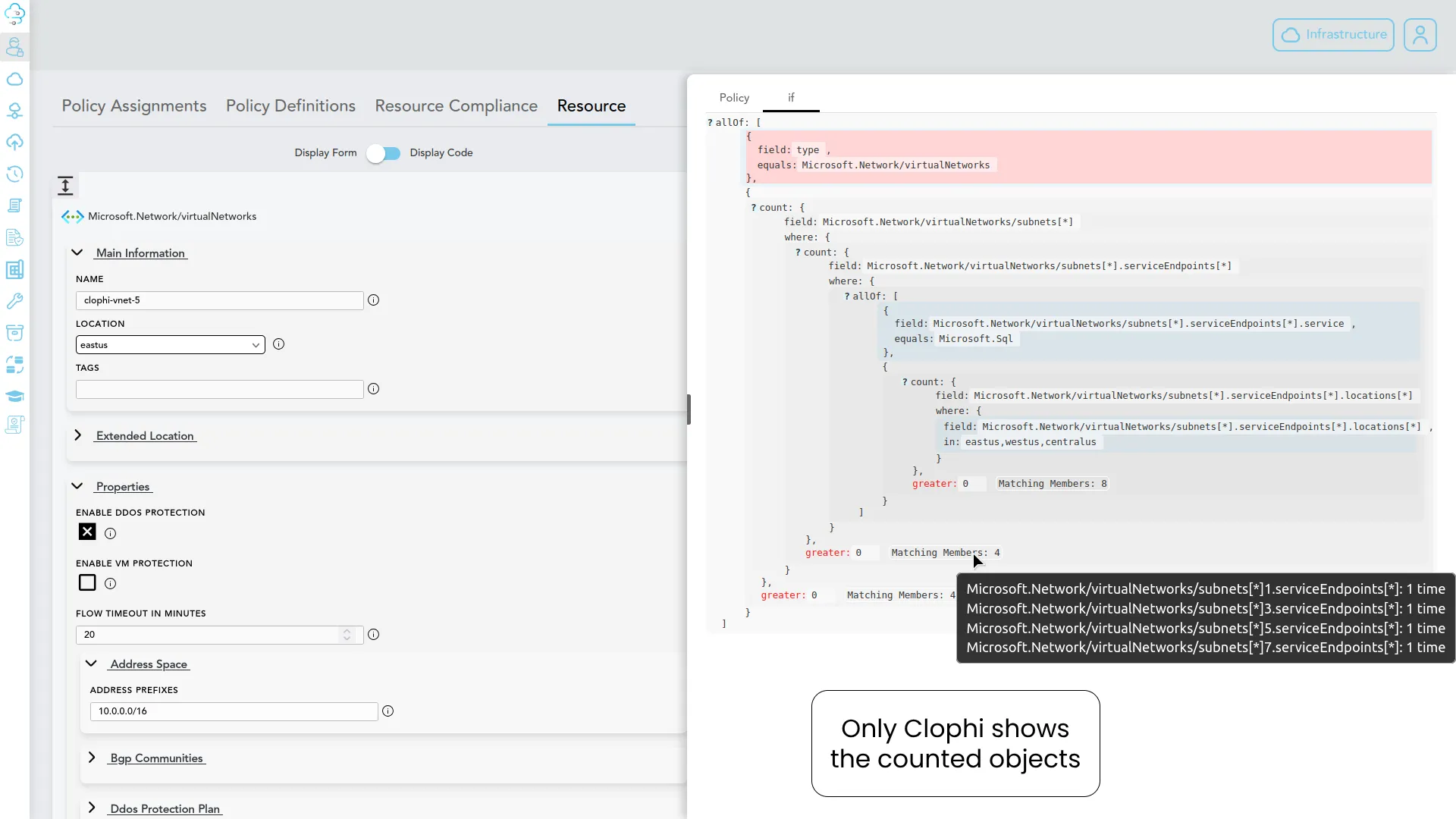
Native Azure Policy dashboard does not provide details for a count operation of a policy. You are fully left in dark! Clophi is the only tool that can show you which specific objects were counted and why.
The Azure blind spot
Azure's compliance view tells you that a count-based rule failed but gives you no visibility into which specific items in the array were counted, or which were skipped. This forces engineers to manually reconstruct the rule logic to find the offending item.
Assignments & initiatives
From definition to policy-as-code in one flow
A policy definition isn't governance until it's assigned. Clophi turns assignment and initiative creation into a single workflow! You can also use built-in Policy-As-Code Export feature to download your live Azure Policy assets as Terraform, Bicep or ARM.
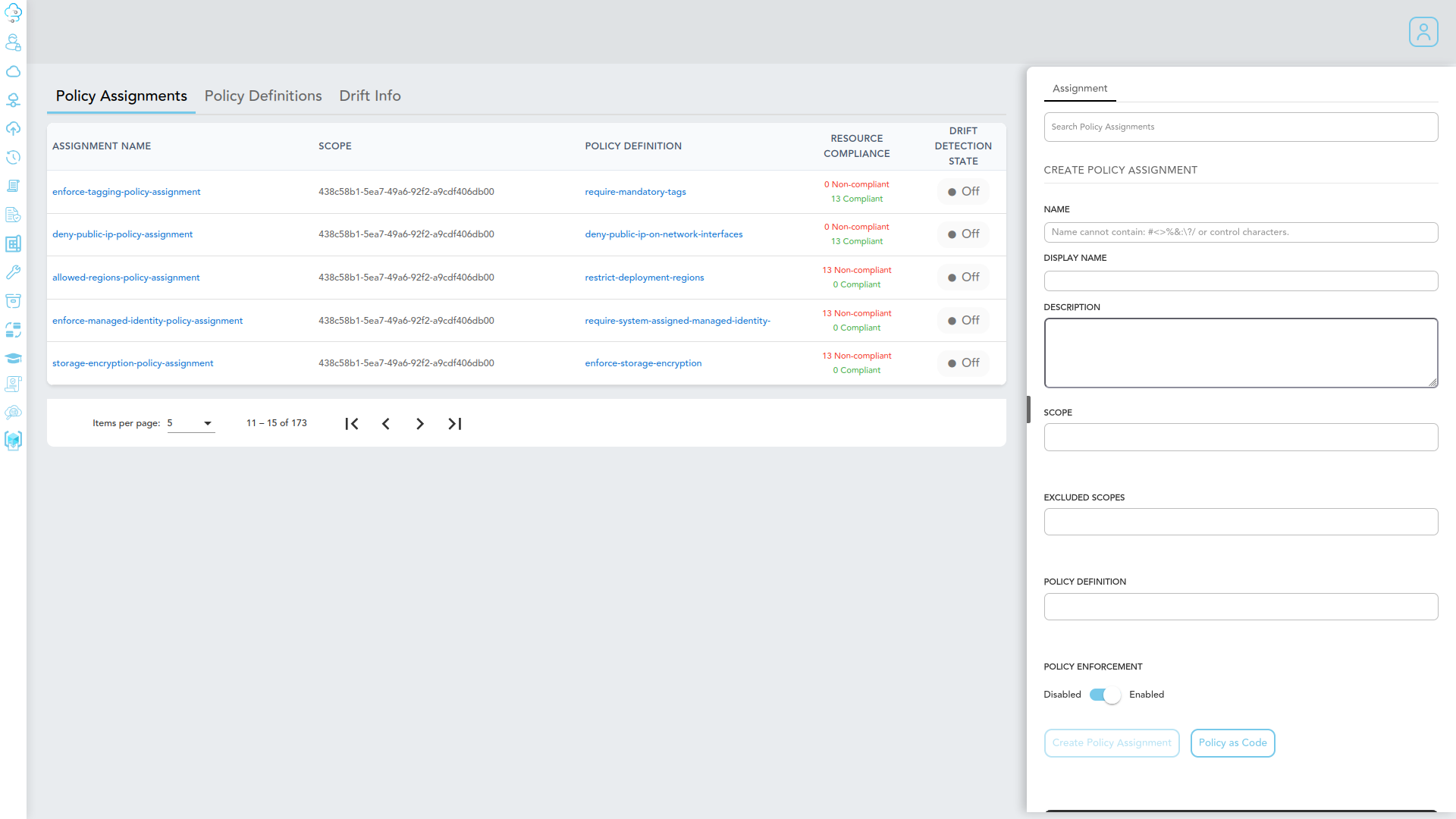
Create assignments and initiatives in Clophi
Use Clophi interface to create assignments in seconds
Export as policy-as-code
Every assignment, initiative, and definition created in Clophi can be exported as policy-as-code in the format your team works in. Available in Terraform, Bicep and ARM Template formats.
Push directly to your repository or download PaC
Clophi is able to deploy your policies to Azure directly but you can also download them as code in format you choose (Terraform, Bicep or ARM). You can also opt to push your policies into your repository from Clophi with our CI/CD integration.
See it on your own tenant
Author a policy and evaluate compliance, in a single demo.
Book a 30-minute demo and we will walk through policy creation, assignment, and field-level compliance evaluation against your own Azure tenant, or in a test environment.